Live at launch

Battlemap Generator for Tactical Maps, Terrain Assets and Cinematic Scenes

120 environment packs. Nine categories. One connected map system.

VISINVOKE™ Battlemaps is a structured map and environment image-generation system for tabletop, VTT and campaign prep. It includes 120 environment packs, nine high-level environment categories and 300 to 600 generators per pack, producing tactical maps, terrain tiles, structure assets, props, cinematic scenes and animated visuals where supported, with up to 4,000 selectable options to choose from per generator.

120
Environment packs
9
Category hubs
Up to 4,000
Options per generator
300 to 600
Generators per pack

A structured map system, not random map prompting

VISINVOKE Battlemaps is built for people who prep encounters for tabletop and virtual tabletop play. Rather than typing a fresh prompt for every map, you work through guided generators with deep selectable-option libraries, so a whole environment shares one coherent look.

The system spans 120 environment packs across nine categories, with 300 to 600 generators per pack. Each generator can include up to 4,000 selectable options to choose from and over one trillion possible combinations, and every pack connects into the wider VISINVOKE platform and the Dashboard.

  • 120 environment packs across nine category hubs
  • Tactical maps, terrain, structures, props, scenes and atmosphere
  • Up to 4,000 selectable options to choose from per generator
  • Controlled repeat generation and accurate variations
  • Account-linked, connected to the wider VISINVOKE platform
Depth and controlled variation

Up to 4,000 selectable options. Over one trillion combinations.

Each generator offers up to 4,000 selectable options to choose from, which combine into over one trillion possible combinations. Because the options are guided rather than random, you can run controlled repeat generation for a consistent map, then create accurate variations from structured selections, changing only what you want without starting from scratch.

Up to 4,000
Selectable options to choose from per generator
A deep structured choice library per generator across layout, terrain, structures, props, hazards and atmosphere.
1,000,000,000,000+
Possible combinations
Over one trillion possible combinations per generator, so an encounter space never has to repeat itself.
Repeatable
Accurate, controlled output
Controlled repeat generation for a consistent map, or slight variations without starting from scratch.
Battlemap output types

Six output types from one system

Every environment pack can produce a full set of encounter-ready outputs, all sharing the pack's visual direction.

Tactical Battlemaps

Grid-ready encounter maps for tabletop and VTT play, laid out for movement, cover and positioning.

Encounter maps

Terrain Tiles

Reusable terrain tiles to build and extend spaces, matched to the pack's environment.

Modular terrain

Structure Assets

Buildings, ruins and constructed features that anchor a scene and give it landmarks.

Buildings and ruins

Props and Object Assets

Props and objects to dress a map, from clutter and cover to interactive set pieces.

Scene dressing

Cinematic Scenes

Cinematic establishing shots and reveals to frame a location before or during an encounter.

Reveals and framing

Animated Visuals

Motion-enhanced outputs where supported, for living water, fire, fog and ambient movement.

Animate where supported
Explore the Battlemap environment categories

Nine environment category hubs

The 120 packs are organised under nine category hubs. Each hub lists the packs beneath it, so the network stays readable as it grows.

Civilization Environments

Cities, districts, plazas, civic spaces and built-world encounters.

Examples: City District, Market Square, Grand Plaza packs.
View category

Settlement Environments

Villages, towns, harbours, frontier posts and inhabited locations.

Examples: Village, Frontier Town, Harbour Town packs.
View category

Wilderness Environments

Forests, plains, wild trails, natural routes and outdoor encounters.

Examples: Haunted Woods, Temperate Forest, Open Plains packs.
View category

Mountain Environments

Cliffs, passes, highlands, ridges and vertical terrain.

Examples: Mountain Pass, Cliff Ledge, Highland Ridge packs.
View category

Dungeon Environments

Crypts, vaults, labyrinths, ruins and dungeon interiors.

Examples: Ancient Crypt, Trapped Labyrinth, Ruined Citadel packs.
View category

Underground Environments

Caverns, underdark areas, crystal caves, tunnels and subterranean spaces.

Examples: Underdark Caverns, Crystal Cavern, Mushroom Cavern packs.
View category

Coastal Environments

Harbours, beaches, tidepools, sea cliffs and shoreline encounters.

Examples: Coastal Harbour, Tidepool Shore, Sea Cliff packs.
View category

War Environments

Siege fields, camps, battlefields, war ruins and military encounters.

Examples: Siege Field, War Camp, Battlefield Ruins packs.
View category

Supernatural Environments

Feywild, Shadowfell, astral, infernal, planar and magical encounter spaces.

Examples: Feywild Glade, Shadowfell Waste, Astral Rift packs.
View category
Proof of the generator model

One encounter direction, controlled map and scene variation

This is proof of the VISINVOKE generator model. From the same structured map direction, you can produce a consistent encounter space, then create a controlled variation by changing selected options, no need to restart from a blank prompt. Battlemaps is the system shown here; the same repeatability and controlled variation run across every VISINVOKE image system. A map, tactical scene or environment pack output can be varied along the axes below.

Lighting

Shift from day to dusk to torchlit night.

Weather

Clear, rain, fog, snow or storm.

Props

Add, remove or rearrange scene objects.

Atmosphere

Calm, tense, cursed or otherworldly.

Hazard level

Dial environmental danger up or down.

Encounter tone

Ambush, standoff, chase or set piece.

Tactical layout

Open ground, choke points or verticality.

Cinematic style

Flat top-down or dramatic scene framing.

Change one axis and you get a deliberate variation of the same encounter, not a brand-new map. That is what keeps a session's maps coherent while still giving each beat its own feel.
Your map workspace

Keep building from your saved map history

VISINVOKE does not treat each map as a disposable one-off result. Generated maps become reusable builds inside your workspace, where you can return to recent builds, continue a build, duplicate it, organise builds into collections, save presets and create controlled variations through Quick Edit. For Battlemaps, a creator can generate a map, tactical scene or environment pack output, then return later to create variants with different lighting, weather, props, atmosphere, encounter tone, cinematic feel or output type.

Recent Builds

Return to recent maps in an account-linked Build Workspace, with build history and clarity indicators.

Continue Build

Reopen a map build and keep going, instead of starting again from a blank prompt.

Duplicate and refine

Duplicate a map to branch a new direction, then refine it while keeping the original intact.

Collections

Organise generated assets into collections and keep a campaign's maps and scenes together.

Saved Presets and Templates

Save presets and reusable configurations, and start from templates for a recurring environment look.

Quick Edit variations

Create controlled variations from an existing map build, and animate outputs where supported.

Quick Edit

Quick Edit lets you reopen a generated map build and adjust structured controls without starting from scratch. Instead of a blank prompt, you keep the original direction and generate a deliberate variation.

LightingWeatherPropsAtmosphereScaleDetailOutput countCredit-cost visibility

The VISINVOKE difference: not random one-off prompting and not disposable image generation. Repeatable map direction, organised build history, controlled variation from existing work, saved presets and reusable configurations, all in an account-linked workspace.
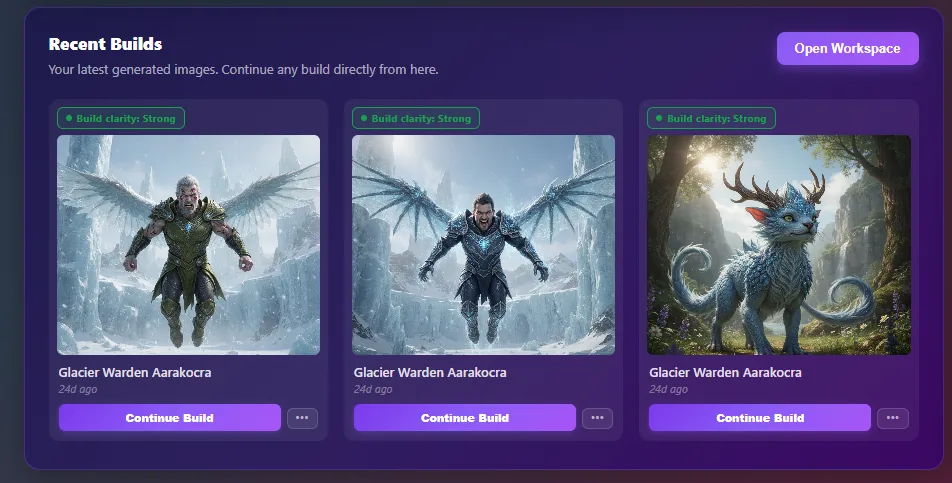
VISINVOKE recent builds showing saved image builds with repeatable direction and continue-build actions.
VISINVOKE Build Workspace example. Workspace and interface example only. Every generated map becomes a saved build you can continue, duplicate and vary. This shows the VISINVOKE interface, not a battlemap output.
Built for tabletop, VTT and encounter prep

From the prep desk to the table

Battlemaps is shaped around the real work of running encounters, so what you generate has a clear place in your session.

Encounter prep

Build the maps you need before you sit down to run.

VTT prep

Prepare tactical maps for your virtual tabletop of choice.

Terrain planning

Assemble modular terrain for flexible encounter spaces.

Location reveals

Reveal a place with a cinematic scene at the right moment.

Set dressing

Dress a map with props and objects for a lived-in feel.

TV-table sessions

Display maps and scenes on a shared screen at the table.

Discord campaign planning

Share maps with your table between sessions.

Encounter handouts

Prepare map references and handouts to share in play.

Structured, not random

Structured map generation, not random map prompting

The difference is coherence and reuse. Guided generators give you an encounter you can return to and vary. Random prompting gives you maps you have to fight to match.

VISINVOKE Battlemaps

Guided generators, reusable direction
  • 120 packs and nine categories in one coherent system
  • Up to 4,000 selectable options to choose from per generator
  • Over one trillion possible combinations
  • Controlled repeat generation and accurate variations
  • Saved builds, Quick Edit and Dashboard access

Random one-off map prompting

Disconnected results
  • Each prompt starts from scratch with no shared system
  • Hard to match a location again later
  • Maps in one campaign do not share a tone
  • No saved builds to return to or vary
  • Slow reuse because every map is a fresh guess
Tabletop and VTT

Designed for tabletop and VTT use

Battlemap outputs are designed for use with tabletop and virtual tabletop play, and are usable as maps, references, terrain visuals and encounter assets where suitable, so they slot straight into how your table already runs.

Roll20FoundryOwlbear RodeoFantasy GroundsAlchemyAboveVTT

Designed for use with these systems. VISINVOKE does not claim direct integrations.

  • Encounter prep and terrain planning
  • Maps and references for play
  • Terrain visuals and encounter assets where suitable
  • TV-table and local sessions
  • Discord campaign planning
  • Prepared for tabletop and VTT workflows
Part of VISINVOKE

Where Battlemaps connects

Battlemaps is one part of a connected platform. These systems work alongside it across your campaign and command needs.

Questions

VISINVOKE Battlemaps FAQ

Common questions about the pack and category system and how it fits the wider VISINVOKE platform.

What is VISINVOKE Battlemaps?
VISINVOKE Battlemaps is a structured map and environment image-generation system for tabletop, VTT and campaign prep. It includes 120 environment packs, nine high-level environment categories, 300 to 600 generators per pack, and multiple output types for tactical maps, terrain tiles, structure assets, props, object assets, cinematic scenes and animated visuals where supported.
How many environment packs are planned?
Battlemaps is planned as 120 environment packs, organised under nine high-level environment category hubs.
What are the nine Battlemap environment categories?
The nine categories are Civilization, Settlement, Wilderness, Mountain, Dungeon, Underground, Coastal, War and Supernatural Environments. Each becomes a category hub that lists the packs beneath it.
What output types can Battlemaps create?
Tactical battlemaps, terrain tiles, structure assets, props and object assets, cinematic scenes, and animated visuals where supported.
How many generators are in each pack?
Each environment pack includes roughly 300 to 600 generators, covering the pack's maps, terrain, structures, props, scenes and atmosphere.
How does VISINVOKE create controlled map variations?
VISINVOKE uses structured generator controls instead of a single open prompt. Each generator can include up to 4,000 selectable options and over one trillion possible combinations, so you can keep the same encounter direction while changing selected details such as weather, lighting, layout, props, hazard level, encounter tone or cinematic atmosphere.
What is the Build Workspace?
Generated maps are saved as reusable builds in an account-linked Build Workspace. You can return to recent builds, continue a build, duplicate it, organise builds into collections and save presets, rather than treating each map as a disposable one-off result.
What is Quick Edit for Battlemaps?
Quick Edit lets you reopen a map or scene build and adjust structured controls such as lighting, weather, props, atmosphere, scale, detail and output count, keeping the original direction while generating a deliberate variation.
Can I use Battlemaps in VTT systems?
Battlemap outputs are designed for use with tabletop and virtual tabletop play, and are usable as maps, references, terrain visuals and encounter assets where suitable for systems such as Roll20, Foundry, Owlbear Rodeo, Fantasy Grounds, Alchemy and AboveVTT. VISINVOKE does not claim direct integrations with these systems.
Are animated outputs available?
Animated visuals are available where supported. Not every output is animated; motion-enhanced outputs are offered where the generator and output type support them.
Do I need a paid plan to start?
You can create a free VISINVOKE account and access the Dashboard. Full system access opens at launch on 30 October 2026.

Build your encounter maps from one VISINVOKE account

Create a free VISINVOKE account, open the Dashboard, and prepare tactical maps, terrain, structures, props, cinematic scenes and controlled variations for launch on 30 October 2026.